Use cases are used to organize system requirements and models a system/actor interaction, this interaction must achieve a goal. The actor is not limited to humans, it can also be a system. Use cases are often used to describe the goals of the different stakeholders involved with the project. In other words, they are used to represent how the real world interacts with the system.
Use cases are important because it acts as a summary of what the system offers. They also help in defining roles and the actions that each role can take within the system. They define a user’s needs and can prevent problems that would otherwise arise if development starts with less planning.
In order to create use cases, there are a couple of steps that need to be done:
Identifying the users.
Create user profiles, which include the role of each user.
Associate goals with the roles.
Define a use case for each one of the goals.
Structure the use cases.
Review the work done.
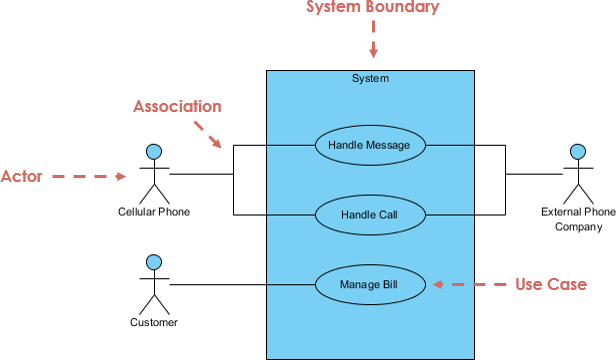
One easy way to show use cases is through the use of a use case diagram. The diagram shows the different roles, the goals, the associations between roles and goals, and the system itself. The diagram makes use cases easier to understand.
With use cases you can see an overview of the system and how users will interact with it. It’s a useful tool to use before development starts to eliminate and possible confusion.
Unified Process (UP) or Unified Software Process is an iterative and incremental approach to software development. This model is heavily based on use cases. A use case is how two or more entities interact with each other. When you receive a list of requirements by a customer, each one of these requirements can be turned into a use case. These use cases need to be specific on what they do so the output can be measured. Some examples of use cases are uploading an assignment, adding an item to a shopping cart, paying for the items in the shopping cart. All these functionalities are iterations. Another characteristic is that UP is architecture-centric. This means that a great part of the work done is to create a blueprint of the software system, defining the different technologies that are going to be used, choosing a programming language, etc. Coding takes a secondary role. Another benefit of UP is that it tries to identify risk as fast as possible so the high-risk factors can be addressed first
UP has variations, and the one that will be talked with more detail in this post is Rational Unified Process (RUP). RUP took inspiration from previous iterative software development models. It was created by Rational Software Corporation, which was bought by IBM in 2003 and became a division of that same company. While RUP has a set of phases and steps, it is designed to be an adaptive model, so you can tailor it to the specific needs of your project. RUP is made based on six fundamental best practices:
Develop software iteratively: encourages working on high-risk factors on every step of the development.
Manage requirements: keeping track of requirements, documentation and business requirements.
Use component-based architectures: puts emphasis on using components that are reusable on this project and future ones.
Visually model software: representing the project visually with components and the relations between them.
Verify software quality: tests design and implementation during the whole cycle.
Control changes to software: tracks all changes that have occurred with the software, and even changed that will inevitably occur.
There are four main phases in RUP. First, inception, which is when the idea is born and it’s decided if it’s worth pursuing it. Second, elaboration, the requirements along with the cost of the project are calculated, possible applications to use during the implementation are also decided. Third, construction, this is where most of the coding happens. The software is designed, written and tested. Finally, transition, When the software is finally released to the public, future updates are based on user feedback.
With RUP, companies have a structured way to create software. It prevents losing big amounts of time and money due to unforeseen risks. The following video explains RUP clearly in a short time.
One other popular variation of UP is Open Unified Process (OpenUP), which is tied to the agile philosophy. It is of a collaborative nature and is based on micro-increments.
Thanks to Unified Processes, it will be easier for companies to develop software, or hire a company to develop it for them. The company can choose the variation of UP that best ties to its needs.
For this mastery topic, I will be talking about software development life cycles. A life cycle is a process that starts right at the moment when it is decided to start a project until the moment the project is no longer needed, removed, deleted. One of the oldest models is known as the waterfall model, which will be explained later in more detail. From this one model, many more came to be because, as with most things in tech, many people wanted to create their own version of it. So new models started emerging, and now, there are a great number of them and it can be difficult to choose one. The life cycle models covered in this post are some of the most popular ones, but more models can easily be found if none of these meet the requirements four your project.
However, not every life cycle is created equal. Each model has its own strengths and weaknesses. The model you choose can depend on the type of project you are doing (web application, Android application, etc.), the company you work for, and many other factors. I will explain in detail two popular models and why you would want to use them, as well as briefly explaining some others.
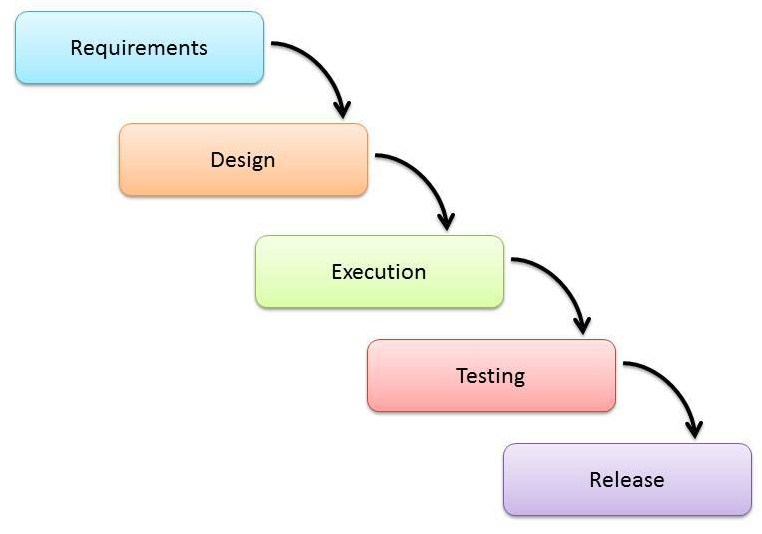
First, let’s talk about the waterfall model. This model follows a linear sequential flow. Moving from one step to the next, however, you only move to the next step until the previous one has been completed. It is not possible to go to previous step. This model is simple to implement and it’s very easy to manage. The downsides are that it’s a high risk model and that implementation is done at the very end, making it very difficult to identify problems in advance. This model is more geared towards short projects that have well defined requirements.
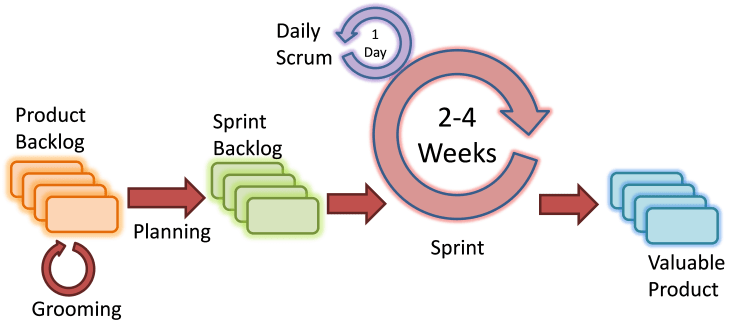
Now, I will talk about the agile model. This model turns development into cycles or iterations. These iterations are short, just a couple of weeks long. At the end of each iteration, there will be a functional result that the customer will be able to see. Thanks to this, if there is something that the customer doesn’t like, it is easily fixed before it becomes a bigger problem in the future. Among the benefits of agile development are: face to face communication since there are weekly meetings (sprints), risks are minimized and fast release of the first versions of the product. And, as it’s to be expected, this model has its weaknesses, like difficulty measuring costs and that it requires highly skilled engineers. Agile is recommended for projects that don’t requiere a lot of initial planning and for projects that are prone to constant changes.
While these 2 models are among the most popular ones, there are many more to choose from. For example, the V-Shaped model is similar to the waterfall model, but planning starts much earlier. There’s also the evolutionary prototype model, which consists of making many different prototypes and merging them all at the end. Moreover, there’s the spiral model, which has a strong emphasis on risk analysis and prototyping.
So there really isn’t a wrong answer when picking a life cycle model, it all depends on your needs. It’s just a matter of being aware of what you need and what you have so you don’t make the wrong decision and end up losing money and time.
This is my first post in this blog. I will talk a little about myself as well as the first activity, which was creating this blog.
To start, I’m Miguel Barro Encinas and I study computer science at Tec de Monterrey. This blog is part of a course about analysis and modeling of software systems. During this course, I will learn about design patterns, object oriented design, UML and many more topics. I really like programming and, although I won’t be doing any coding during this course, this course will make it so I’m more efficient and make better decisions when I do code.
Now, let me talk about my experience creating this blog. I have never used WordPress. I have heard of it multiple times, but never had the need to use it. For past classes, when I needed a blog, I always used Blogger. WordPress was recommended so I decided that I might as well try it out instead of using the one I already knew.
One of the biggest hurdles when creating this blog was finding the free option. It was mentioned in the assignment description that there was a free option for WordPress. However, I couldn’t find it at first. I was actually looking for third party sites online that could host my site, but they all had a cost. After a lot of searching, I was able to find the free option. It was difficult to find, made it seem like WordPress doesn’t want you to find it and wants you to pay instead. But I was able to find it and created this blog.
And now that I have created this blog, there is so much I need to learn about WordPress in order to make good posts. Sure, plain text is really easy, but what if I wanted to use images, videos, upload files, etc. I hope that during this course I will learn how to make good blogs and how to make good use of the tools that WordPress provides.
 Miguel's Blog